What is WordPress Website Hosting and How Does It Work?
WordPress website hosting is crucial for anyone looking to build their online presence. It refers to the service that stores your website files, making them accessible on the internet. Without this hosting, a website cannot exist as visitors would not be able to find it.
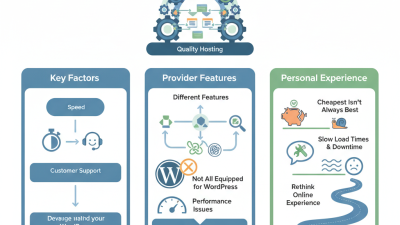
There are various types of hosting available. Shared hosting is cost-effective but may lead to slower loading times. Dedicated hosting offers better performance but can be expensive. It’s important to analyze your needs before making a choice. Many businesses underestimate the impact of reliable hosting. A poorly chosen WordPress website hosting plan may frustrate users and harm your site’s reputation.
Choosing the right hosting provider is overwhelming. You may feel tempted to go for the cheapest option. However, the consequences can be dire. Slow loading speeds and downtime can harm your search engine ranking. Reflecting on these factors can lead to better decisions. Good hosting is the backbone of a successful website.

What is WordPress Website Hosting?
WordPress website hosting is a specialized service for those who want to create a site using WordPress. It offers the resources needed to run a WordPress site efficiently. Many hosting providers optimize their servers specifically for WordPress. This ensures fast loading times and better performance.
When choosing hosting, consider what you need. Think about storage, bandwidth, and support. Not all hosting packages are created equal. Some may not meet your expectations. It's essential to do a bit of research before making a decision.
**Tip:** Look for user reviews. They can provide real insights about the hosting service.
Security is also crucial. A reliable host will protect your site from potential threats. Some hosts offer automatic updates, which can save you time. But, don't overlook the need to back up your site manually. Sometimes, automatic systems may fail.
**Tip:** Regular backups are your safety net. Keep your data secure and accessible.
In the end, understanding WordPress website hosting can help you build and manage a better site. Explore your options and reflect on what works best for you. This choice can shape your online presence significantly.
What is WordPress Website Hosting and How Does It Work?
| Hosting Type |
Description |
Advantages |
Disadvantages |
| Shared Hosting |
Multiple websites share a single server's resources. |
Cost-effective, easy to use for beginners. |
Limited resources, potential for slower performance. |
| VPS Hosting |
A virtual private server provides dedicated resources. |
More control, better performance than shared hosting. |
Higher cost, requires some technical know-how. |
| Dedicated Hosting |
A single server exclusively for one website. |
Complete control, optimal performance. |
Very expensive, requires advanced technical management. |
| Managed WordPress Hosting |
Optimized hosting specifically for WordPress sites. |
Convenient, often includes automatic backups and updates. |
Can be pricier than traditional hosting. |
| Cloud Hosting |
Uses a network of servers to handle hosting needs. |
Scalable, reliable and better uptime. |
Potentially complex to manage costs. |
Types of WordPress Hosting Services Available
When exploring WordPress hosting, it's essential to understand the various types available. Shared hosting is a common choice. In this setup, multiple websites share the same server resources. This option is budget-friendly and easy to use. However, sharing resources can lead to slower speeds and limited performance during high traffic periods. According to industry reports, nearly 80% of new websites start on shared hosting.
VPS (Virtual Private Server) hosting is another popular type. It provides more control and resources compared to shared hosting. With VPS, a physical server is divided into virtual servers. This allows for better performance and security. Research indicates that sites on VPS can handle around 40% more traffic than those on shared hosting. Yet, it requires more technical knowledge to manage effectively.
Managed WordPress hosting is tailored specifically for WordPress users. This type offers enhanced performance, automatic updates, and security. It targets users who want to focus on content rather than maintenance. While it can be pricier, reports suggest that 67% of users notice improved website speed, which directly impacts user experience. Despite its advantages, some website owners may feel overwhelmed by the higher costs and complexity of transitioning to managed services.
How WordPress Hosting Manages Website Resources
WordPress hosting is vital for optimizing website performance. It manages server resources like CPU, RAM, and storage essential for seamless online operations. According to a 2023 industry report, 40% of users abandon websites that take more than three seconds to load. Efficient resource management directly impacts loading speeds and user satisfaction.
Many hosting providers offer tailored solutions for WordPress. These options include shared, VPS, and dedicated hosting plans. Shared hosting is budget-friendly but may result in slower performance during peak hours. VPS hosting provides dedicated resources, while dedicated hosting promises enhanced speeds for high-traffic sites. It’s crucial to choose a hosting type that aligns with your website’s goals.
Tips: Assess your site’s traffic patterns and choose a plan that can scale. Regularly review resource usage; overloading a server can lead to downtime. Remember, a suitable hosting environment not only supports growth but also enhances user experience. Balancing cost and performance is key for success.
Key Features to Look for in WordPress Hosting
When choosing WordPress hosting, key features can significantly impact your website's performance. Look for speed and reliability. A fast-loading site attracts visitors. Downtime can frustrate users and affect your reputation. Check if the hosting offers uptime guarantees. Aim for 99.9% or higher.
Security is another critical feature. Websites face various threats daily. Ensure your host provides SSL certificates and regular backups. Knowing your site is backed up will give you peace of mind. Some hosting solutions include firewalls to protect against attacks. A secure environment is invaluable.
Customer support must not be overlooked. Technical issues can arise at any point. A responsive support team can help resolve problems quickly. Search for hosts offering 24/7 support through various channels. This level of assistance creates a safety net for website owners. Reflect on your needs and pick a hosting service that aligns with them.
WordPress Website Hosting Key Features Comparison
Understanding the Installation Process of WordPress on Hosting Services
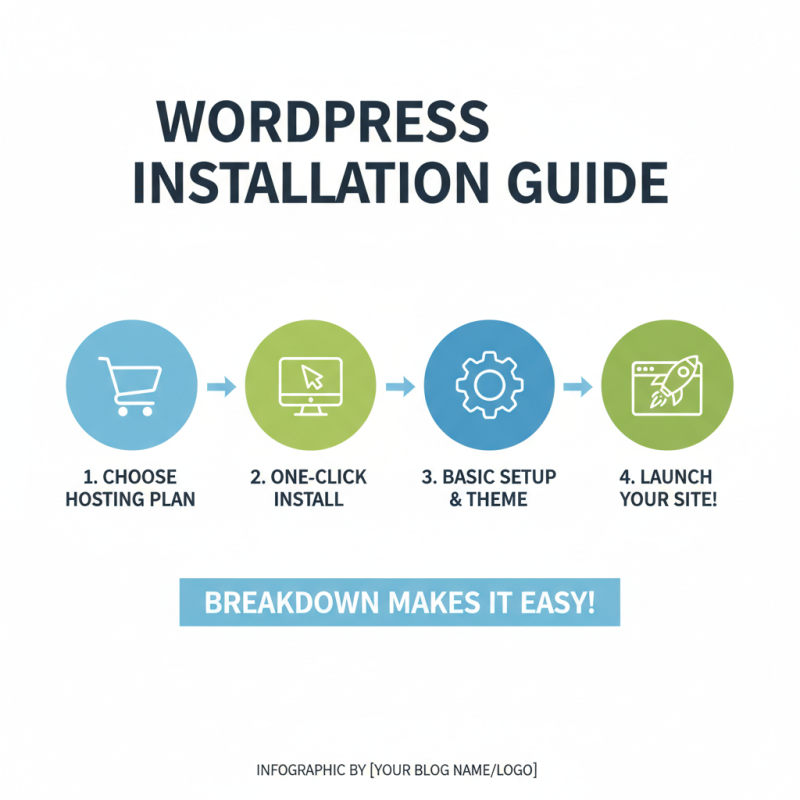
Installing WordPress on a hosting service can feel overwhelming at first. Many beginners struggle with the technical aspects. But breaking it down makes it manageable. Start by choosing a hosting plan that meets your needs. Most services offer easy one-click installations.
Once you’ve signed up, access your hosting account. Look for the control panel. Here, you can find the WordPress installer. It usually requires just a few clicks. After that, you’ll set up your site’s name and details. Take your time with the setup. Mistakes can lead to problems later.
After installation, it’s crucial to customize your site. This is where many users hesitate. Exploring themes and plugins can be exciting yet confusing. Not all options suit everyone. Some themes may slow down your site, while certain plugins can conflict. Keep testing and observing what works best for your needs. While the process may seem tedious, it's a learning opportunity. Embrace the trial and error; over time, you'll gain confidence and clarity.